Table of Contents
ToggleHardwiring a Ring doorbell delivers constant power and eliminates battery swaps, but it requires the right transformer to function properly. Most homes have a doorbell transformer already installed, but older units often don’t meet Ring’s voltage requirements. Understanding what your specific Ring model needs, and how to safely install or upgrade a transformer, prevents frustrating connectivity issues and “low power” warnings. This guide walks through transformer selection, wiring, and troubleshooting so homeowners can confidently power their Ring doorbell.
Key Takeaways
- A transformer for Ring doorbell must provide 16-24V AC with a minimum 30VA rating for Pro models and 40VA for Pro 2 to ensure stable power and prevent ‘low power’ warnings.
- Ring doorbells designed for hardwiring run 24/7 for Wi-Fi and motion detection, requiring a more powerful transformer than older mechanical doorbells that only drew power when the button was pressed.
- Proper installation of a doorbell transformer involves turning off power at the breaker, using correct wire gauges (14 AWG for 120V side, 18 AWG for low-voltage side), and securing all connections in a junction box to prevent safety hazards.
- Voltage drop over long wire runs is a common cause of insufficient power; upgrading wire gauge or choosing a 24V transformer provides headroom to overcome distance-related voltage loss.
- Troubleshooting a non-functioning transformer includes testing output voltage with a multimeter, checking for loose connections, and verifying the transformer isn’t undersized or failing if it emits loud buzzing.
Why Your Ring Doorbell Needs a Transformer
Ring doorbells designed for hardwiring, such as the Ring Video Doorbell Pro, Pro 2, and Elite, require a low-voltage power supply, typically between 16-24 volts AC. Unlike battery-powered models, these units don’t have internal batteries to fall back on: they rely entirely on consistent power from a doorbell transformer.
A transformer steps down standard household voltage (120V AC in the US) to a safe, usable level for doorbell circuits. Without adequate voltage, the doorbell camera won’t boot properly, video quality degrades, or the device repeatedly goes offline. Insufficient power is one of the most common installation mistakes, especially in older homes where the existing transformer was sized for a mechanical chime, not a smart device pulling continuous power.
Most legacy transformers output 8V, 10V, or 16V, which worked fine for traditional doorbells that only drew power when the button was pressed. Ring doorbells, but, run 24/7 to maintain Wi-Fi connectivity, process video, and detect motion. This constant draw means the transformer needs both adequate voltage and current capacity, typically 30VA (volt-amperes) or higher for Pro models.
Before adding or replacing a transformer, locate the existing one. Common hiding spots include:
- Inside the electrical panel or on the panel’s exterior
- In the basement or crawl space near the main service entry
- In the attic near HVAC equipment
- Behind the indoor chime unit
Check the label on the existing transformer to confirm its output voltage and VA rating. If it’s below 16V or rated under 10VA, it’s time for an upgrade.
Choosing the Right Transformer for Your Ring Doorbell Model
Not all Ring doorbells share the same power requirements. Battery-powered models (Ring Video Doorbell 2, 3, 4) can be hardwired but include a rechargeable battery as the primary power source, hardwiring only trickle-charges the battery. These models tolerate a wider voltage range (8-24V) and don’t strictly require a transformer upgrade unless the existing one is extremely weak.
Models like the Ring Video Doorbell Pro and Pro 2 have stricter requirements:
- Ring Video Doorbell Pro: 16-24V AC, minimum 10VA (Ring recommends 30VA)
- Ring Video Doorbell Pro 2: 16-24V AC, minimum 40VA for full functionality (including advanced motion detection)
- Ring Video Doorbell Elite: Powered via Power over Ethernet (PoE), doesn’t use a traditional doorbell transformer
For Pro and Pro 2 installations, a 16V or 24V transformer rated at 30-40VA is the sweet spot. Many smart home enthusiasts gravitate toward 24V units because they provide headroom for voltage drop over long wire runs and support both Ring doorbells and compatible mechanical or digital chimes.
Voltage and Compatibility Requirements
When shopping for a transformer, confirm three specs: output voltage, VA rating, and physical compatibility with your electrical setup.
Output Voltage: Stick to 16V or 24V AC. Ring devices won’t operate on DC transformers or those outside the 16-24V range. Some smart home devices are more forgiving with voltage variance, but Ring doorbells will flag low-power conditions if voltage sags below 16V.
VA Rating: This indicates the transformer’s power capacity. Think of it as the product’s “fuel tank.” A 10VA transformer might technically output 24V, but it can’t sustain the current draw required by a Pro 2 doorbell, especially if a mechanical chime is also in the circuit. Opt for a minimum of 30VA for the Ring Pro and 40VA for the Pro 2.
Chime Compatibility: If keeping a mechanical or digital chime in the circuit, verify that the transformer can handle the combined load. Ring sells a plug-in chime for notifications, which offloads the power demand from the doorbell circuit entirely, a smart workaround if upgrading the transformer isn’t feasible.
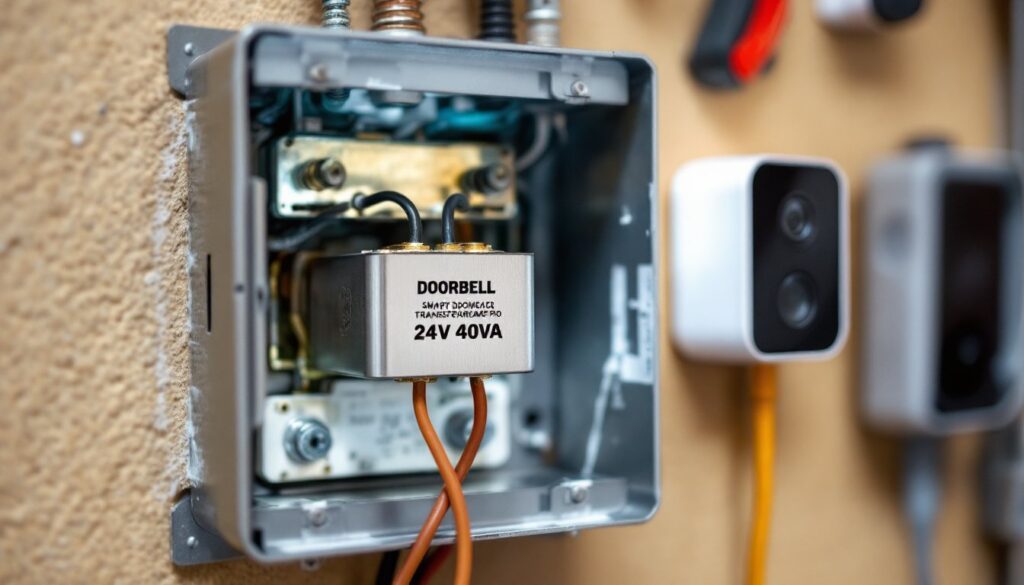
Most quality transformers use screw terminals or wire leads for connections. Look for UL-listed units that meet National Electrical Code (NEC) standards. Common models include the Newhouse Hardware 24V/40VA and the Stancor P-6010, both widely available at home centers and online retailers.
How to Install a Transformer for Your Ring Doorbell
Installing a doorbell transformer involves working with 120V household wiring. This is a straightforward project for someone comfortable with basic electrical work, but it’s also the type of task where mistakes can cause shorts, fire hazards, or code violations. If in doubt, hire a licensed electrician, many will swap a transformer in under an hour.
Safety Precautions Before Starting
Turn off power at the breaker. Locate the circuit breaker controlling the doorbell or the nearest junction box where you’ll tie in the transformer. Flip it off and verify with a non-contact voltage tester. Don’t rely on wall switches alone.
Wear safety glasses and insulated gloves. Even low-voltage doorbell wiring can surprise you if the transformer is still energized.
Check local codes. Most jurisdictions allow homeowners to install doorbell transformers without a permit, as they’re considered low-voltage devices. But, if you’re adding a new circuit or working inside the main panel, a permit may be required. Verify with your local building department.
Use proper wire gauges. For the 120V side (line voltage), use 14 AWG or 12 AWG wire depending on the circuit amperage. For the low-voltage side (doorbell wiring), 18 AWG or 20 AWG is standard. Don’t substitute speaker wire or lamp cord, use solid or stranded copper wire rated for the application.
Step-by-Step Installation Process
-
Identify the power source. The transformer’s primary (high-voltage) side connects to a 120V circuit. Common tie-in points include a junction box near the electrical panel, an outlet box, or inside the panel itself (if there’s room and your local code permits it).
-
Mount the transformer. Transformers typically have a knockout or mounting bracket that attaches to a standard electrical box. If surface-mounting, use a box extender or a weatherproof junction box if installing outdoors. Ensure the transformer is accessible for future maintenance.
-
Connect the primary winding (120V side). Strip 1/2 inch of insulation from the black (hot) and white (neutral) wires. Connect the black wire from the circuit to one primary lead on the transformer and the white wire to the other. Polarity doesn’t matter on the primary side of most transformers. Secure connections with wire nuts and wrap with electrical tape. If your transformer has a ground screw, attach the bare copper ground wire from the circuit.
-
Connect the secondary winding (low-voltage side). The transformer’s secondary terminals output 16V or 24V. Run two-conductor doorbell wire (18 AWG or 20 AWG) from the transformer to the Ring doorbell location. These wires aren’t polarized, so either wire can connect to either terminal on both the transformer and the doorbell.
-
Secure all connections inside a junction box. Never leave wire nuts or splices exposed. Use a proper electrical box with a cover plate. If mounting the transformer inside an enclosure, ensure adequate ventilation, transformers generate heat.
-
Restore power and test. Flip the breaker back on. Use a multimeter set to AC voltage to verify output at the transformer’s secondary terminals. You should read 16-24V AC, depending on the transformer model. If the reading is zero, recheck your primary connections and breaker status.
-
Connect the Ring doorbell. At the doorbell location, connect the two low-voltage wires to the screw terminals on the Ring mounting bracket. Polarity doesn’t matter. Snap the Ring unit onto the bracket and follow the in-app setup.
For most installations, the entire process takes 30-60 minutes. A cordless drill, wire stripper, multimeter, and screwdriver are the primary tools needed. A voltage tester is essential for verifying that power is off before touching any wires.
Troubleshooting Common Transformer Issues
Even with a correctly sized transformer, issues can crop up. Here’s how to diagnose and fix the most common problems.
“Low Power” or “Insufficient Power” warnings in the Ring app: This indicates the doorbell isn’t receiving adequate voltage. Possible causes:
- Voltage drop over long wire runs (common in homes where the transformer is 50+ feet from the doorbell)
- Undersized transformer (check the VA rating)
- Corroded or loose wire connections at the transformer, chime, or doorbell terminals
- A mechanical chime drawing too much power from the circuit
Solution: Test voltage at the doorbell terminals with a multimeter. If it reads below 16V, upgrade the transformer or use a thicker wire gauge (16 AWG instead of 18 AWG) to reduce resistance. If a chime is in the circuit, try bypassing it temporarily with a Ring Pro Power Kit (included with Pro models) or remove it entirely.
Transformer hums or buzzes constantly: A slight hum is normal, but loud buzzing often signals a failing transformer or loose mounting hardware. Tighten the mounting screws and verify that all wire connections are secure. If the noise persists, replace the transformer, buzzing can indicate internal winding degradation.
Doorbell works intermittently or goes offline: This can stem from loose doorbell wiring, a tripped breaker, or Wi-Fi issues unrelated to the transformer. Start by checking all low-voltage connections for tightness. Verify that the transformer’s output voltage is stable (16-24V AC). If the voltage fluctuates, the transformer may be undersized or failing.
Breaker trips when the doorbell is pressed: This suggests a short circuit, often caused by exposed wires touching metal surfaces or incorrect wiring on the 120V side. Turn off the breaker immediately, inspect all connections, and ensure no bare wire is contacting the junction box or other conductors. If you’re uncertain, call an electrician.
No power at the transformer’s secondary terminals: Double-check that the breaker is on and that the 120V connections are secure. Use a multimeter to test for 120V on the primary side. If present but no output on the secondary, the transformer is defective and should be replaced.
Mechanical chime doesn’t ring after installing a new transformer: Some digital or mechanical chimes require a specific voltage range. If you upgraded from 16V to 24V, the chime may not be compatible. Either replace the chime with a 24V-compatible model or use Ring’s plug-in Chime for notifications.
Keep in mind that while a new transformer solves most power-related Ring doorbell issues, video quality and connectivity also depend on Wi-Fi signal strength and router placement. If power is stable but the doorbell still underperforms, troubleshoot the network separately.
By selecting a properly rated transformer, following safe installation practices, and methodically troubleshooting any hiccups, homeowners can ensure their Ring doorbell runs reliably for years. The upfront effort pays off in consistent video feeds, instant motion alerts, and zero battery anxiety.